
n8n WordPress blog automation is the process of using the n8n.io platform to connect applications like AI writers, data sources, and your WordPress site to automatically create and publish content. This allows you to generate articles, create images, and schedule posts without manual intervention, saving significant time.
This guide breaks down how these workflows function, provides three practical templates, and explores the critical limitations of a DIY setup. We'll cover everything from sourcing topics to the post-publishing process, highlighting what it takes to move from simple automation to a system that genuinely drives SEO results.
What is n8n WordPress Blog Automation?
n8n WordPress blog automation uses n8n, a source-available workflow automation tool, to create a pipeline that publishes content to your website. Think of it as a series of connected blocks, or "nodes," where each node performs a specific task. A typical workflow starts with a trigger, processes data through several action nodes, and ends by creating a post in WordPress.
Key components of an n8n workflow include:
- Trigger: The event that starts the automation. This could be a new row added to a Google Sheet, a scheduled time (e.g., every Monday at 9 AM), or a manual execution.
- Action Nodes: These are the workhorses of the system. A node might call the OpenAI API to write an article, connect to a service to generate an image, or format text into HTML.
- WordPress Node: The final node in the chain. It takes the content, title, images, and other data generated by the previous nodes and uses them to create a new draft or published post directly on your WordPress installation.
This node-based visual interface allows for incredible flexibility, enabling you to connect hundreds of different apps and services to build a content machine tailored to your exact needs.
Why Automate Your WordPress Blog? The Real Numbers
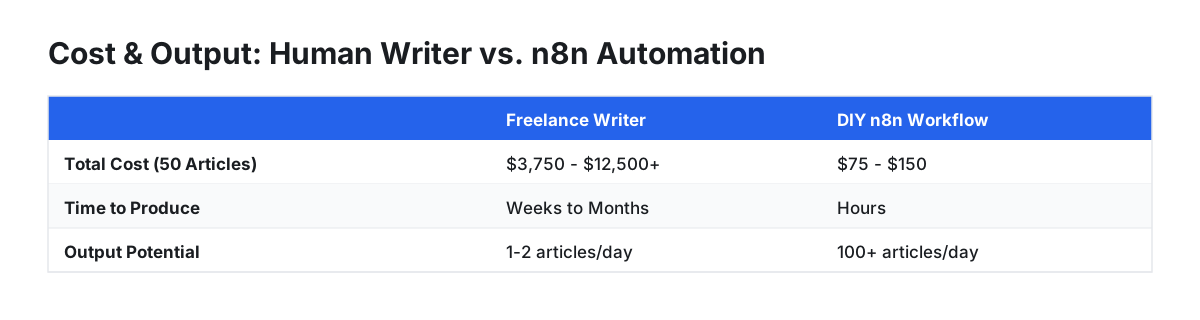
Automating your blog with n8n primarily saves time and dramatically increases content velocity. But the abstract benefits of 'scalability' and 'consistency' become much clearer when you look at the actual costs and output.
Cost-Effectiveness: Human Writer vs. n8n API Calls Let's compare the cost of producing 50 SEO-focused articles of around 1,500 words each.
| Method | Cost per Article (Estimate) | Total Cost for 50 Articles | Time to Produce | Output Potential |
|---|---|---|---|---|
| Freelance Writer | $75 - $250+ | $3,750 - $12,500+ | Weeks to Months | 1-2 articles/day (max) |
| DIY n8n Workflow | $1.50 - $3.00 (API costs) | $75 - $150 | Hours (for publishing) | 100+ articles/day |
Assumptions: Freelancer at $0.05-$0.15/word. API costs based on GPT-4 Turbo pricing for text and DALL-E 3 for one image per article. This excludes the one-time cost of time for building and debugging the workflow.
As the table shows, the direct cost savings are staggering. For the price of one or two human-written articles, you can generate an entire library of content. This allows a solo founder or small team to achieve a publishing cadence that was previously only possible for large media companies.
How to Build n8n WordPress Automation Workflows (3 Templates)

Instead of just one basic approach, here are three distinct workflow templates you can adapt, ranging from simple to more advanced.
Template 1: The Classic Content Engine (Google Sheets Trigger)
This is the most common setup. It reads topics from a spreadsheet and turns them into blog posts.
- Nodes:
Google Sheets->OpenAI->DALL-E 3->WordPress (Upload Media)->WordPress (Create Post) - Process:
- Trigger: A new row with a column for
topicis added to a Google Sheet. - Generate Text: The
topicis fed into an OpenAI node with a detailed prompt to write a full article. - Generate Image: The same
topicis sent to an image generation node to create a relevant featured image. - Upload & Publish: The image is uploaded to the WordPress media library, and its ID is used when the final node creates the post with the title and text.
- Trigger: A new row with a column for
Template 2: The Content Repurposing Machine (YouTube to Blog)
This workflow automatically turns video content into SEO-optimized articles.
- Nodes:
HTTP Request(YouTube API) ->Code(extract video ID) ->Whisper API(or similar) ->OpenAI->WordPress - Process:
- Trigger: Manually run or schedule to check a specific YouTube playlist for new videos.
- Transcribe: Use an audio transcription service to get the full text from the video.
- Rewrite: Feed the raw transcript into an OpenAI node with a prompt like: "Rewrite the following video transcript into a well-structured, SEO-optimized blog post. Identify the main topics and create relevant H2 headings. Remove filler words and conversational language."
- Publish: Send the polished article to WordPress.
Template 3: The News-Jacking Automator (RSS Feed Trigger)
This is ideal for blogs that comment on industry news. It monitors feeds and creates summary posts.
- Nodes:
RSS Feed Read->Filter->OpenAI->WordPress - Process:
- Trigger: The workflow runs on a schedule (e.g., every hour), checking a specific RSS feed for new items.
- Filter: A filter node checks if the article's title contains relevant keywords, ensuring you only comment on specific topics.
- Summarize & Add Commentary: The content of the new article is sent to an OpenAI node with a prompt like: "Summarize the following article and add a short paragraph of expert commentary on its potential impact on [Your Industry]. Adopt a [Your Brand Tone] tone."
- Publish: The new summary and commentary are published as a draft for review.
The Hidden Challenges of DIY Automation (with Evidence)
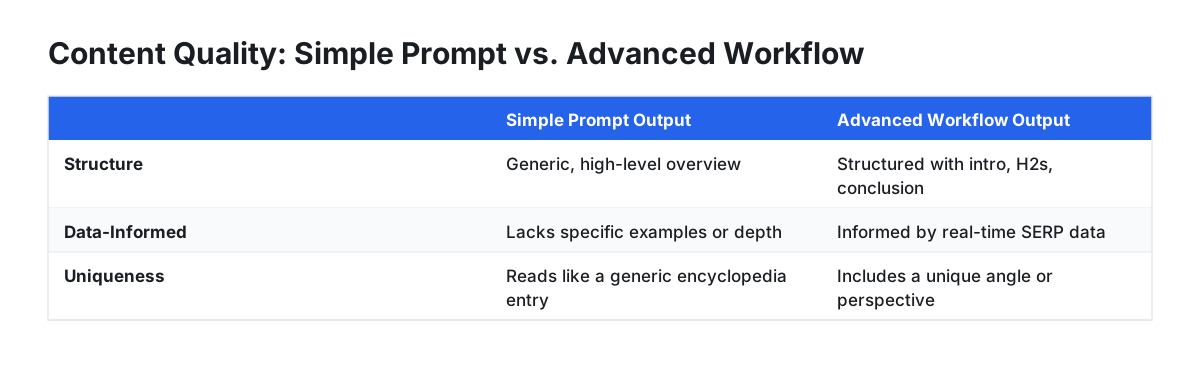
A simple n8n workflow is easy to build, but a reliable, high-quality one is not. The leap from a fun project to a business-critical system reveals several significant hurdles.
Workflow Complexity and Fragility: A production-ready workflow is rarely just five nodes. It includes error handling, data formatting, retry logic, and multiple AI calls for different sections (e.g., title, intro, body). A workflow can easily balloon to 20+ nodes, becoming difficult to debug when a single API call fails or a service changes its output format.
Generic vs. Quality AI Content: The quality of your output depends entirely on the sophistication of your prompts and process. A simple prompt yields generic content that won't rank.
| Simple Prompt Output | Advanced Workflow Output |
|---|---|
"Write a blog post about n8n." |
A structured article with an intro, H2s, a conclusion, internal link suggestions, and optimized meta description. This is achieved via multiple, chained AI calls, each responsible for a specific part of the article. |
| Generic, high-level overview of automation. Lacks specific examples or depth. | Content is informed by real-time SERP data (scraped via another node) to ensure it covers topics ranking competitors discuss. |
| Reads like a generic encyclopedia entry. | Includes a unique angle or perspective defined in the workflow logic, setting it apart from other AI-generated articles. |
- The Post-Publishing Black Hole: The biggest limitation is the lack of a feedback loop. Your n8n workflow's job ends the moment it hits 'publish'. It doesn't know if the article ranked #1 or #101. It can't identify which posts are underperforming or why. This means you're still left with the manual, time-consuming task of analyzing SEO performance in Google Search Console and updating content.
Where to Find n8n Templates and Help
You don't have to build every workflow from scratch. The n8n community is active and shares a wealth of knowledge.
- n8n.io Community: The official site is the best place to start. It has hundreds of pre-built workflow templates that you can copy and paste directly into your n8n instance.
- GitHub: This is the go-to resource for more complex, user-submitted workflows. Search for terms like "n8n wordpress automation" or "n8n blog workflow" to find repositories where developers share the raw
.jsonfiles for their setups. You can import these directly into n8n. - Reddit: The
r/n8nsubreddit is an invaluable resource for troubleshooting and inspiration. It's where users discuss common API errors (like429 Too Many Requestsrate limits), share creative workflow ideas, and get help debugging complex logic.
Beyond DIY: When to Consider an Integrated SEO Platform
For many, the challenges of DIY automation—manual keyword research, complex prompt engineering, and the absence of a performance feedback loop—create a ceiling on results. When your goal shifts from simply publishing content to reliably ranking it, an end-to-end platform becomes the more strategic choice.
Tools like PilotScribe are designed to solve the entire SEO content lifecycle, not just the publishing step. The process starts with strategy: the platform analyzes a user's website to find buyer-intent search terms. It then handles the creation of SEO-optimized long-form articles.
Critically, it closes the post-publishing feedback loop that dooms most DIY setups. A key differentiator is that PilotScribe automatically monitors how each article ranks on Google. It's built to improve posts that underperform by rewriting weak titles, refreshing fading content, and working to push page-2 articles higher. This moves beyond simple automation into a managed SEO strategy, connecting content creation directly to performance outcomes.
While DIY n8n gives you ultimate flexibility, a dedicated platform offers a streamlined, results-focused path to achieving organic traffic growth.
FAQ
How do I automate my WordPress blog?
The most direct way is to use an SEO automation platform that handles keyword research, content creation, and publishing. For those who want granular control and have technical skills, building custom workflows with a tool like n8n is a powerful alternative, allowing you to connect various APIs directly to your site.
What is the best AI blog writing agent?
The "best" agent depends on your goal. For pure writing quality and flexibility, using the OpenAI API via n8n is excellent. For SEO-specific features, tools like SurferSEO or Agility Writer are popular choices. For a complete end-to-end solution that includes keyword research and post-publish optimization, a platform like PilotScribe is designed to manage the entire lifecycle.
Can I use n8n for free?
Yes, n8n is source-available, meaning you can download and host it on your own server for free with full functionality. They also offer paid cloud-hosted plans if you prefer not to manage the infrastructure yourself.
Does n8n integrate with OpenAI?
Yes, n8n has a robust, official node for OpenAI. This allows you to easily integrate models like GPT-4 for text generation and DALL-E for image creation into any workflow by simply adding your API key.